Why I moving from NVM to Volta

Nowadays, when we need to work with multiple apps and products, and each one has its own version of libraries, it is important to make your environment flexible to changes.
At that moment, nvm becomes a great option to run multiple versions of Node on my machine, but I’m moving between multiple projects some of them with diferents version of node and needs to rememeber to tell nvm use a specific version is a time that i want to save.
Then Volta comes to save my time, Volta make sure my project has the same tools—without interfering with their workflow or needs to tell which enviroment is required.
The most loved feature of Volta is that it automatically switches to the correct Node.js and package manager versions when you cd into a project directory, without needing a manual command like nvm use 22.
By using the volta pin command, we set the Node version for the project, which automatically creates a Volta section in the package.json. This is used when moving between projects.
Using Volta
First, let's install Volta. Since I'm using Windows, I'll use winget for the installation.
winget install Volta.VoltaAfter that, you just need to install Node by choosing the LTS version or selecting a specific version like 20.0.0.

Automatic Node Switching
As I mentioned, Volta helps us set the Node version in the package.json by running the volta pin command. Let's show a demo.
First, I create a new project and use the command volta pin to set the version to node@20.
mkdir first-genkit
npm init -y
volta pin node@20
success: pinned node@20.19.2 (with npm@10.8.2) in package.json
Next, create another directory and start a new project. In this project, use the Node LTS version and pin it using the volta pin node command.
mkdir second-genkit
npm init -y
volta pin node
success: pinned node@22.16.0 (with npm@10.9.2) in package.json
Now, when I move between projects, the Node version switches automatically like magic! It also supports switching from npm to yarn.
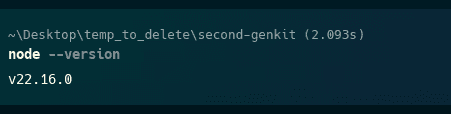
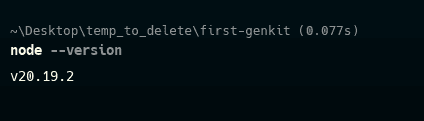
I switched two months ago and forget nvm use 🤣! give a try it! https://volta.sh/
Happy coding!
Reflections on career, soft skills, productivity, and the human side of programming.
Related Articles
Developer Tools I Use and Recommend
A transparent list of developer tools I use daily - from productivity powerhouses like Warp and GitKraken to minimalist gems like There and Mole. Some are referrals, all are essential.
How to use BulmaCSS with Parcel
Hello, I'm a poor css guy who always uses a framework like bootstrap, and today I decided to use Bulma CSS. Bulma allows use by CDN or NPM. The CDN is an easy way to use but with some caveats. No Sass for customizing. Large file (complete Bulma fram...
Share this article
If you found this guide helpful, consider sharing it with your team or fellow developers.
Real Software. Real Lessons.
I share the lessons I learned the hard way, so you can either avoid them or be ready when they happen.
Join 13,800+ developers and readers.
No spam ever. Unsubscribe at any time.