How to Use NgRx Selectors in Angular

In NgRx, when we want to get data from the store, the easiest way is by using store.select. It allows us to get any slice of the state. Yes, it sounds funny, but any slice returns an Observable<any>.
For example:
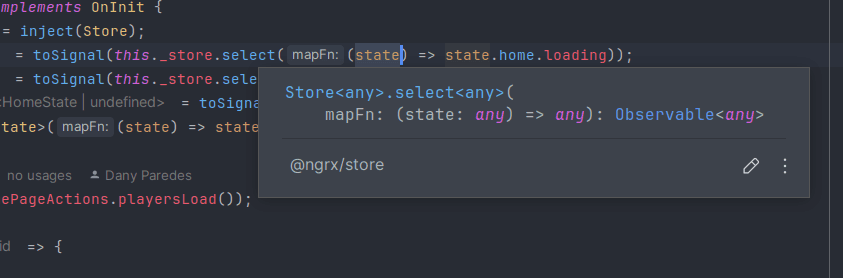
It is flexible but also risky because, what happens if our state structure changes? The best way to fix this is by using Selectors. Let's play with them!
NgRx Selectors
The Selectors help us get slices of the store state with type safety. They act like a mirror of our state, making it easy to use anywhere and allowing us to avoid repeating the same code in our application.
NgRx provide two functions createFeatureSelector() and createSelector() to create selectors.
The createFeatureSelector function allows us to define a type-safe slice of our state using our state definition.
export const selectHomeState = createFeatureSelector<HomeState>('home');The createSelector function uses the featureState as the first parameter and a second function to get the featureState and pick the slice.
export const selectLoading = createSelector(
  selectHomeState,
  (homeState) => homeState.loading
)
We already know the NgRx selector functions, so let's use them and have some fun 🔥!
Creating Selectors
It's time to start using createFeatureSelector and createSelectorin our project. We continue with the initial project of NgRx, clone it, and switch to the action-creators branch.
git clone https://github.com/danywalls/start-with-ngrx.git
git switch action-creators
Open the project with your favorite editor, and create a new file src/app/pages/about-me/state/home.selectors.ts. Next, import the createFeatureSelector and createSelector functions. Use createFeatureSelector with the HomeState interface to create selectHomeState.
export const selectHomeState = createFeatureSelector<HomeState>('home');After that, use selectHomeState to create selectors for players, loading, and acceptTerms.
export const selectLoading = createSelector(
selectHomeState,
(homeState) => homeState.loading
)
export const selectPlayers = createSelector(
selectHomeState,
(homeState) => homeState.players
)
export const selectAcceptTerms = createSelector(
selectHomeState,
(homeState) => homeState.acceptTerms,
)We can also compose selectors. For example, if we want to know when the players have data and the user has accepted the terms (acceptTerms), we can create selectAllTaskDone. This combines the selectPlayers and selectAcceptTerms selectors to check if all tasks are done.
export const selectAllTaskDone = createSelector(
  selectPlayers,
  selectAcceptTerms,
  (players, acceptTerms) => {
    return acceptTerms && players.length > 0;
  }
)
The final code in home.selectors.ts looks like this:
import {createFeatureSelector, createSelector} from "@ngrx/store";
import {HomeState} from "./home.state";


export const  selectHomeState = createFeatureSelector<HomeState>('home');

export const selectLoading = createSelector(
  selectHomeState,
  (homeState) => homeState.loading
)

export const selectPlayers = createSelector(
  selectHomeState,
  (homeState) => homeState.players
)
export const selectAcceptTerms = createSelector(
  selectHomeState,
  (homeState) => homeState.acceptTerms,
)

export const selectAllTaskDone = createSelector(
  selectPlayers,
  selectAcceptTerms,
  (players, acceptTerms) => {
    return acceptTerms && players.length > 0;
  }
)
Okay, with the selectors ready, it's time to refactor home.component.ts to use them. Import each selector from home.selectors.ts.
Note: Remove the
toSignalfunction and usestore.selectSignalsto automatically transform the selectors' observables into signals.
  public $loading = this._store.selectSignal(selectLoading);
  public $players = this._store.selectSignal(selectPlayers);
  public $acceptTerms = this._store.selectSignal(selectAcceptTerms);
Finally, create a new variable to use the composable selector selectAllTaskDone.
public $allTasksDone = this._store.selectSignal(selectAllTaskDone);Update home.component.html markup to use the $allTasksDone signals in the template.
@if (!$allTasksDone()) {
  Wait for the players and  accept terms

} @else {
  <h2>Everything done!🥳</h2>
}
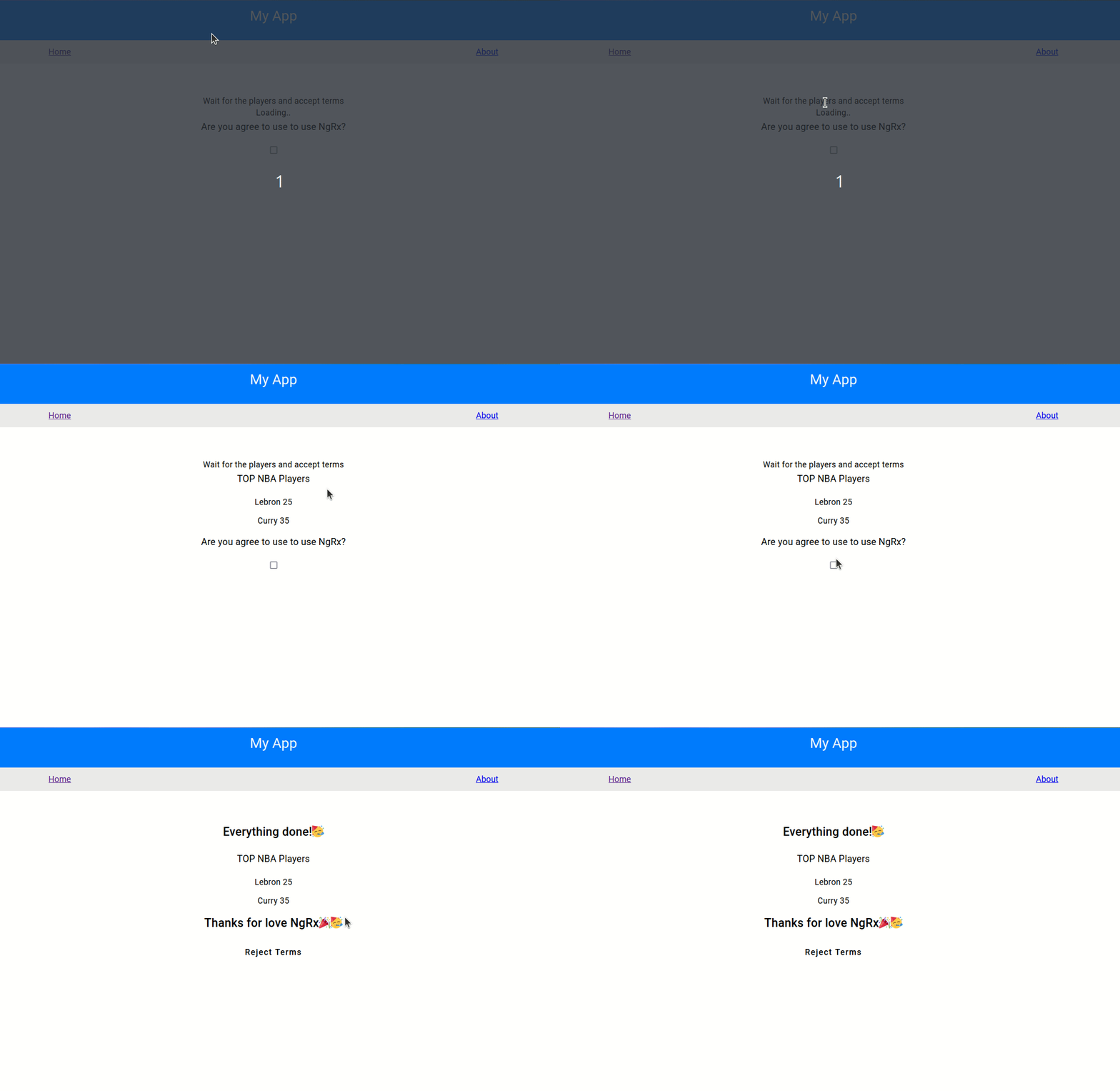
Save the changes, and everything will continue to work 😄. To test the composed selectors, when playersLoadSuccess is triggered and you click on acceptTerms, the message "Everything done!" will be shown!
Conclusion
We learn how to use selectors to retrieve and manage state slices in NgRx, instead of directly using store.select , getting the benefits of type-safe selectors with createFeatureSelector and createSelector and composing selectors.
Modern frontend development — Angular, React, TypeScript, accessibility, and performance.
Frequently Asked Questions
What is the difference between createFeatureSelector and createSelector in NgRx?
createFeatureSelector creates a type-safe top-level selector that points to a named feature slice of the global store state. createSelector then takes one or more of these feature selectors as input projectors and derives more specific pieces of state from them. Together they allow you to compose selectors in a maintainable, testable way without scattering raw state access through your components.
Why should I use NgRx selectors instead of accessing store state directly with store.select?
Using raw store.select with a string path or anonymous function returns an Observable of type any, which loses all type safety and breaks silently if the state structure changes. Selectors created with createFeatureSelector and createSelector are fully typed, memoized so they only recompute when their inputs change, and can be reused across components, greatly reducing duplication and improving performance.
How does memoization work in NgRx selectors and why does it improve performance?
NgRx selectors are memoized by default, meaning they cache their last computed result and only recalculate when one of their input selectors emits a new reference. This prevents unnecessary recalculations and avoids triggering change detection in Angular components when the underlying state value has not actually changed, which is especially valuable in large applications with complex derived state.
Related Articles
How to Debug NgRx Using Redux DevTools in Angular
Learn how to debug NgRx state in modern Angular with Redux DevTools: configure provideStoreDevtools, trace actions, inspect diffs, and use time-travel debugging.
How to Handle Side Effects in Angular Using NgRx Effects
Side-effects! They are one of the most common tasks in our applications. In Angular, but build application if we don't take care the component ends with a lot of responsability, like get, process and render the data. But in Angular most of time when ...
How to Implement ActionCreationGroup in NgRx
When you create actions in NgRx, you usually use the createAction function helper. We write our action names with an inline string about the source and the event, like [Cart] Update Price. This action is clearly linked with the Cart feature in our ap...
Understanding and Using the inject() Function in Angular
A practical guide to Angular's inject() function: property initializers, eliminating constructor inheritance boilerplate, functional guards, and InjectionContext.
How To Test Components In Angular Using TestBed
Learn how to unit test Angular components with TestBed, handle child components and service mocks, and switch from Karma/Jasmine to modern Vitest with Standalone and Signals.
Share this article
If you found this guide helpful, consider sharing it with your team or fellow developers.
Real Software. Real Lessons.
I share the lessons I learned the hard way, so you can either avoid them or be ready when they happen.
Join 13,800+ developers and readers.
No spam ever. Unsubscribe at any time.