---
title: "Using RxJS as State Manager in Angular"
date: "2023-02-17"
slug: "using-rxjs-as-state-manager-in-angular"
author: "Dany Paredes"
canonical: "https://danywalls.com/using-rxjs-as-state-manager-in-angular"
description: "When we build an Angular App, the communication between components is something to take care of. We can start using parent-to-child with Input and Output events; the lack of input and output communication is the only parent-to-child or vice versa, bu..."
---
When we build an Angular App, the communication between components is something to take care of. We can start using parent-to-child with Input and Output events; the lack of input and output communication is the only parent-to-child or vice versa, but when the app starts to grow with routing and more than parent and children components. Hence, the next step is to use Angular Services with `Rxjs`.
Rxjs services work fine in small applications with little state. Inject a service with a `BehaviorSubject` property and subscribe to keep it in sync, but if your app has many entities, settings, and user configurations, and these changes need to reflect or react in several components, only using services becomes a bit hard to maintain or maybe not.
We must be aware of the responsibility of a single component or when to refactor it. Creating a new component for a specific scope and taking care of when a single component has many services injected is a red flag. Let's show a small example.
## Scenario
We must build an app with the home, profile, orders, and payment sections.
* Each section must allow saving data in the state.
* The home must render data from each section.
* Each Order discount from the balance.
We will use Rxjs Behavior subject to keep state and some rxjs operators to simplify and combine some operators.
## Setup The Project
First, using the Angular CLI, create the project:
```bash
>ng new angular-and-states
? Would you like to add Angular routing? Yes
? Which stylesheet format would you like to use? CSS
```
When finished, go to the new directory from the terminal and create two pages, `home` and `settings` using the Angular/CLI and running the command \`ng g c and the component name.
```bash
PS C:\Users\dany.paredes\Desktop\angular-and-states> ng g c /pages/payments
CREATE src/app/pages/payments/payments.component.html (23 bytes)
CREATE src/app/pages/payments/payments.component.spec.ts (640 bytes)
CREATE src/app/pages/payments/payments.component.ts (283 bytes)
CREATE src/app/pages/payments/payments.component.css (0 bytes)
UPDATE src/app/app.module.ts (774 bytes)
PS C:\Users\dany.paredes\Desktop\angular-and-states> ng g c /pages/orders
CREATE src/app/pages/orders/orders.component.html (21 bytes)
CREATE src/app/pages/orders/orders.component.spec.ts (626 bytes)
CREATE src/app/pages/orders/orders.component.ts (275 bytes)
CREATE src/app/pages/orders/orders.component.css (0 bytes)
UPDATE src/app/app.module.ts (862 bytes)
PS C:\Users\dany.paredes\Desktop\angular-and-states> ng g c /pages/profile
CREATE src/app/pages/profile/profile.component.html (22 bytes)
CREATE src/app/pages/profile/profile.component.spec.ts (633 bytes)
CREATE src/app/pages/profile/profile.component.ts (279 bytes)
CREATE src/app/pages/profile/profile.component.css (0 bytes)
UPDATE src/app/app.module.ts (954 bytes)
```
For the navigation, create the component navigation using the same command but in the path `components`:
```bash
ng g c /components/navigation
```
Update the navigation.component.html markup using the directives to navigate:
```html
HomePaymentsOrdersProfile
```
Next, remove the default markup in the `app.component.html` and add the following markup with ``
```bash
App
```
Add the routes in the `app-routing.module.ts`
```typescript
const routes: Routes = [
{
component: HomeComponent,
path: ''
},
{
component: OrdersComponent,
path: 'orders'
},
{
component: PaymentsComponent,
path: 'payments'
},
{
component: ProfileComponent,
path: 'profile'
}
];
```
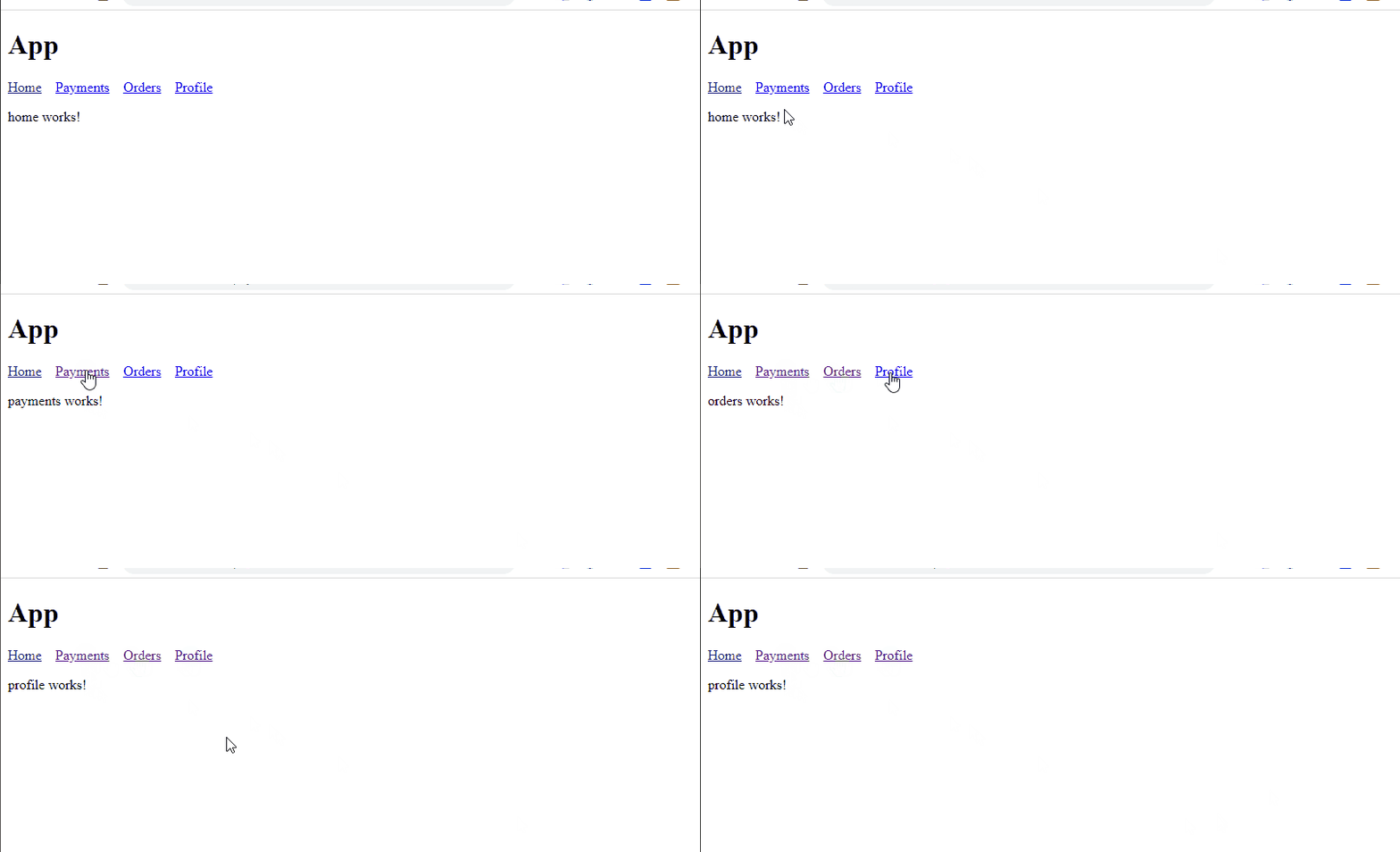
Save and run the command `ng s -o`, and the app must render the home component with navigation.
## Adding State with Services
We need to save the state for each section, creating a service for each one 'profile', 'orders', and ' payments',
Using the `angular/cli` run `ng g s /services/profile` to share data about profile between components using `BehaviorSubject`.
> Read more about [BehaviorSubject](https://www.learnrxjs.io/learn-rxjs/subjects/behaviorsubject)
Create two properties: -`nameSubject$` ss an instance of `BehaviorSubject`, and it's initialized with the null value.
* The `name$` public property that exposes the `nameSubject` as an observable.
```typescript
@Injectable({
providedIn: 'root'
})
export class ProfileService {
private nameSubject = new BehaviorSubject(null);
public name$ = this.nameSubject.asObservable()
public saveName(name: string) {
const message = `Hi ${name} `
this.nameSubject.next(message);
}
}
```
Repeat the process for `PaymentService`, which holds the account balance.
```bash
ng g s /services/payments
CREATE src/app/services/payments.service.spec.ts (367 bytes)
CREATE src/app/services/payments.service.ts (137 bytes)
```
Create two properties, `paymentSubject$` starting with balance in `0` and `paymentBalance$`, and add two methods:
* `addBalance` Save the balance in the `behaviorSubject`.
* `updateBalance` Decrease the currentBalance.
```typescript
import {Injectable} from '@angular/core';
import {BehaviorSubject} from 'rxjs';
@Injectable({
providedIn: 'root'
})
export class PaymentsService {
private paymentSubject$ = new BehaviorSubject(null);
public paymentBalance$ = this.paymentSubject.asObservable()
public updateBalance(balance: number) {
const currentBalance = this.paymentSubject.getValue();
if (currentBalance) {
const totalBalance = currentBalance - balance;
this.paymentSubject$.next(totalBalance);
}
}
public addBalance(balance: number) {
this.paymentSubject$.next(balance);
}
}
```
Finally, create the `OrdersServices` to hold all orders.
```bash
ng g s /services/orders
CREATE src/app/services/orders.service.spec.ts (357 bytes)
CREATE src/app/services/orders.service.ts (135 bytes)
```
The service contains an array of orderIds.
```typescript
import {Injectable} from '@angular/core';
import {BehaviorSubject} from 'rxjs/internal/BehaviorSubject';
@Injectable({
providedIn: 'root'
})
export class OrdersService {
private orderSubject = new BehaviorSubject([]);
public orders$ = this.orderSubject.asObservable()
public addOrder(orderId: number) {
const orders = [...this.orderSubject.value, orderId]
this.orderSubject.next(orders);
}
}
```
We already have our services states; next, we will use these services in the components.
## Using Services State In Components
We have the services to save the data. Our next step is to use it on each page. The process is to inject the service into the component and use the method and the subject to get the value from the service.
The `ProfileComponent`, allows saving his name, storing it in the observable, and providing the `saveName` method from the service.
First, inject the service `ProfileService`, and add a new variable `name$` to link with the observable `name$` from the service.
Next, add a new method, `save`, with the parameter name, in the method body, to use the `saveName` from the service.
The final code looks like this:
```typescript
import { ProfileService } from './../../services/profile.service';
import { Component, inject, OnInit } from '@angular/core';
@Component({
selector: 'app-profile',
templateUrl: './profile.component.html',
styleUrls: ['./profile.component.css'],
})
export class ProfileComponent {
name$ = this.profileService.name$;
constructor(private profileService: ProfileService) {}
save(name: string) {
this.profileService.saveName(name);
}
}
```
In the component HTML markup, add a new input with the template variable #name to get access to the input value, and add a button to call the `save` method, passing the variable `name.value` refers to the method.
To render the name, use the pipe `async` subscribe to `name$` observable to show the `nameSaved` in the service.
The final code looks like this:
```html
Please type your Name:
{{nameSaved}}
```
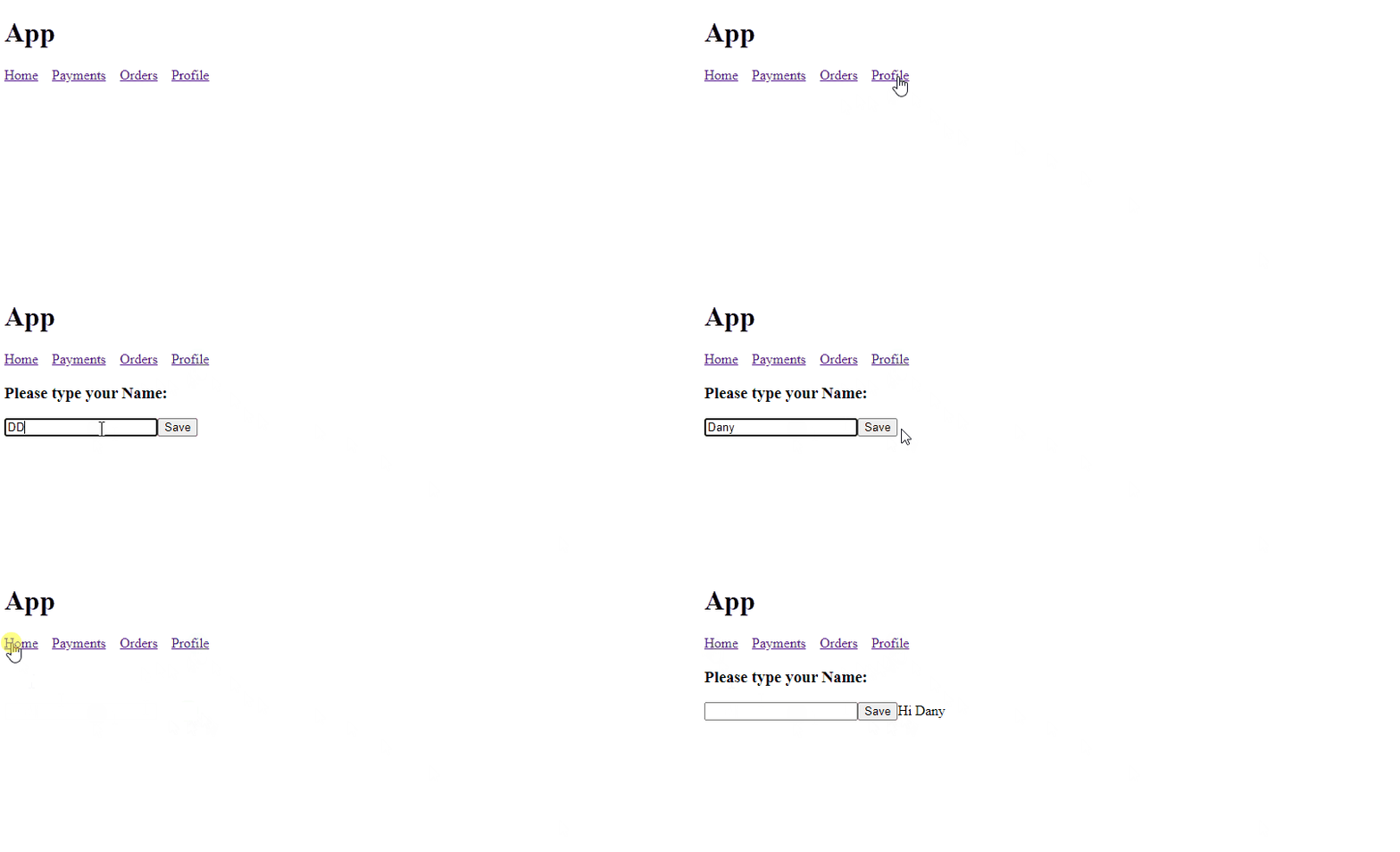
We already set up the state for the profile section, saved the changes, and ran the app with `ng s -o`. It opens the app to the profile section, adds your name, and moves between other sections, storing the name.
Repeat the same steps for payment.
* Add the services
* Add input to Markup for the user to add the value.
#### Payment Component
```typescript
import {PaymentsService} from './../../services/payments.service';
import {Component} from '@angular/core';
@Component({
selector: 'app-payments',
templateUrl: './payments.component.html',
styleUrls: ['./payments.component.css']
})
export class PaymentsComponent {
balance$ = this.paymentService.paymentBalance$;
constructor(private paymentService: PaymentsService) {
}
updateBalance(balance: HTMLInputElement) {
this.paymentService.addBalance(balance.valueAsNumber);
}
}
```
Update the HTML Markup with input and button, and subscribe to the balance$ observable.
```html
Add balance:
You current Balance is: {{balance$ | currency}}
```
#### Orders Component
Repeat the process with orders but with minor changes, The only difference is the orders are an array, and we use `ngFor` to render all sections.
```typescript
import { Component, OnInit } from '@angular/core';
import { OrdersService } from 'src/app/services/orders.service';
@Component({
selector: 'app-orders',
templateUrl: './orders.component.html',
styleUrls: ['./orders.component.css'],
})
export class OrdersComponent {
orders$ = this.ordersService.orders$;
constructor(private ordersService: OrdersService) {}
addOrder(order: HTMLInputElement) {
if (order.value) {
this.ordersService.addOrder(order.valueAsNumber);
order.value = '';
}
}
}
```
```html
Add your order
Your current active orders are:
{{order}}
```
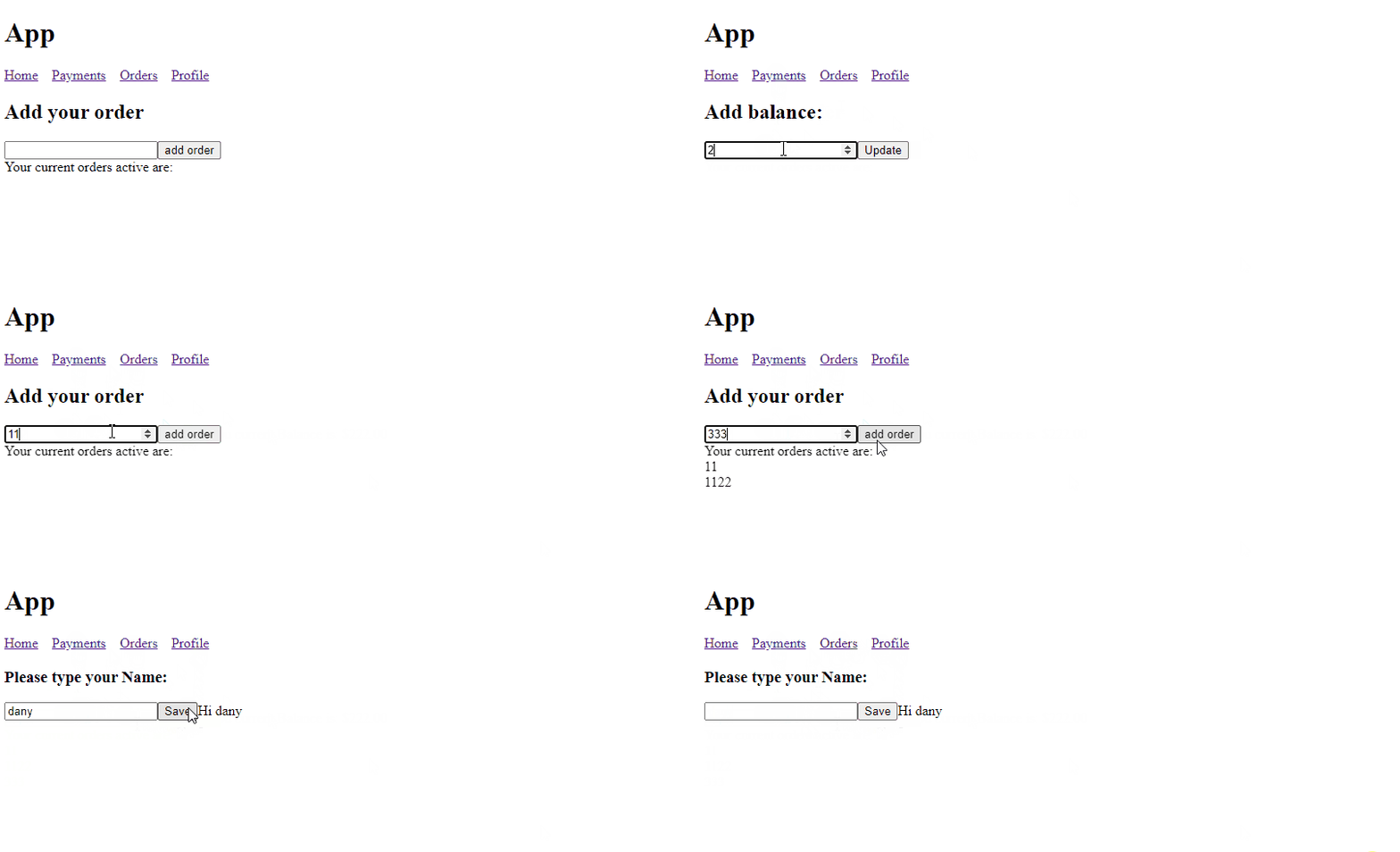
Finally, we have a state in our entities, and the next challenge is to read each service's value to show the data in the home component.
## Combine States and Keep Sync
We have three values in our application:
* payment balance.
* profile info
* orders
Our first challenge when adding a new order in the `OrderComponent` to discount the balance in `paymentService`.
In the `orders.component`, we must make the following points:
* Add `paymentService` and `ordersService` in the constructor.
* Declare a new variable for storing the `currentBalance`.
* Edit the `addOrder` to update the balance with `2` when submitting the order.
The final code looks like this:
```typescript
import {PaymentsService} from '../../services/payments.service';
import {Component} from '@angular/core';
import {OrdersService} from 'src/app/services/orders.service';
import {startWith} from 'rxjs/operators';
@Component({
selector: 'app-orders',
templateUrl: './orders.component.html',
styleUrls: ['./orders.component.css'],
})
export class OrdersComponent {
orders$ = this.ordersService.orders$;
currentBalance$ = this.paymentService.paymentBalance$
constructor(
private ordersService: OrdersService,
private paymentService: PaymentsService
) {
}
addOrder(order: HTMLInputElement) {
this.ordersService.addOrder(order.valueAsNumber);
this.paymentService.updateBalance(2);
order.value = '';
}
}
```
In the HTML Markup, add subscribe to `currentBalance$`. If not, show the template `noBalance` and disable the button if balance <= 0, final code looks like this:
```html
You have {{balance | currency }} as balance, add your orders
Insuficient Balance, please add.
You have ({{orders.length}}) orders.
{{order}}
```
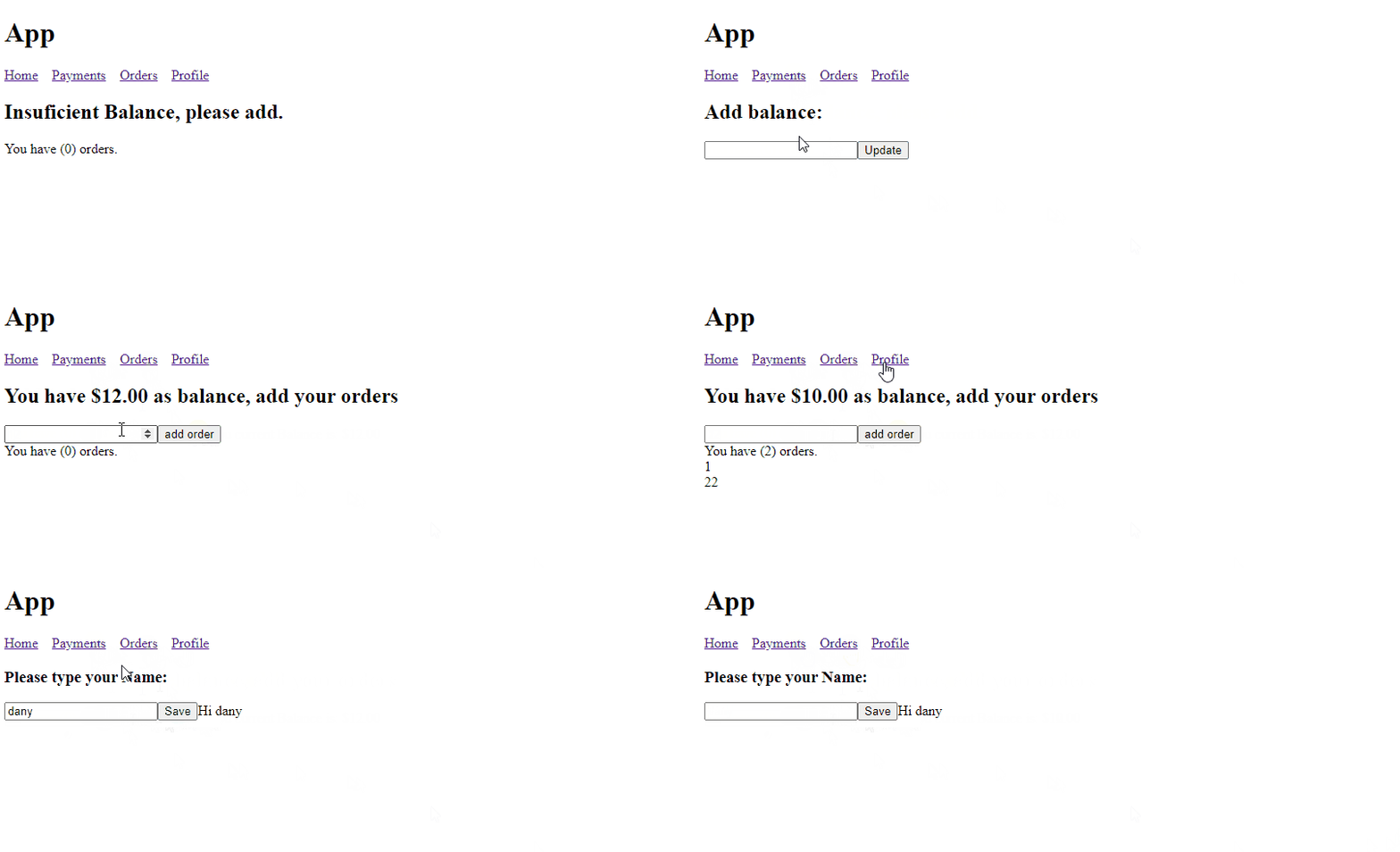
Save the Changes, and the app reloads; add an initial balance, and when you add the order, the balance for each order.
### Combine All States
The challenge with Orders was simple, we added a single service, but what do we want to get data from all services?
Rxjs provide a few operators to combine Observables, like `merge` and `concat`, but in our scenario, we use `combineLatest`.
> Note: combineLatest is deprecated and replaced by [combineLatestWith](https://rxjs.dev/api/operators/combineLatestWith).
We combine each observable in a single object using the map operator and consume it in the template.
* Inject `ProfileService`, `OrdersService`, and `PaymentsService`
* Use the `combineLatest` operator to combine each service data in a single object and subscribe to the template
```typescript
import { Component } from '@angular/core';
import { combineLatest } from 'rxjs';
import { OrdersService } from 'src/app/services/orders.service';
import { PaymentsService } from 'src/app/services/payments.service';
import { ProfileService } from 'src/app/services/profile.service';
import { map } from 'rxjs/operators';
@Component({
selector: 'app-home',
templateUrl: './home.component.html',
styleUrls: ['./home.component.css'],
})
export class HomeComponent {
customerStatus$ = combineLatest([
this.paymentService.paymentBalance$,
this.orderService.orders$,
this.profileService.name$,
]).pipe(
map(([balance, orders, profileName]) => ({ balance, orders, profileName }))
);
constructor(
private profileService: ProfileService,
private orderService: OrdersService,
private paymentService: PaymentsService
) { }
}
```
The HTML Markup `subscribe` to the observable using the pipe async provides the name, balance, and orders.
```html
Hey! {{customerStatus.profileName}}, your balance is {{ customerStatus.balance | currency }}
in {{customerStatus.orders.length}}
{{ order }}
```
Save changes, and the browser reloads when each observable emits the home component to get the data for each one.
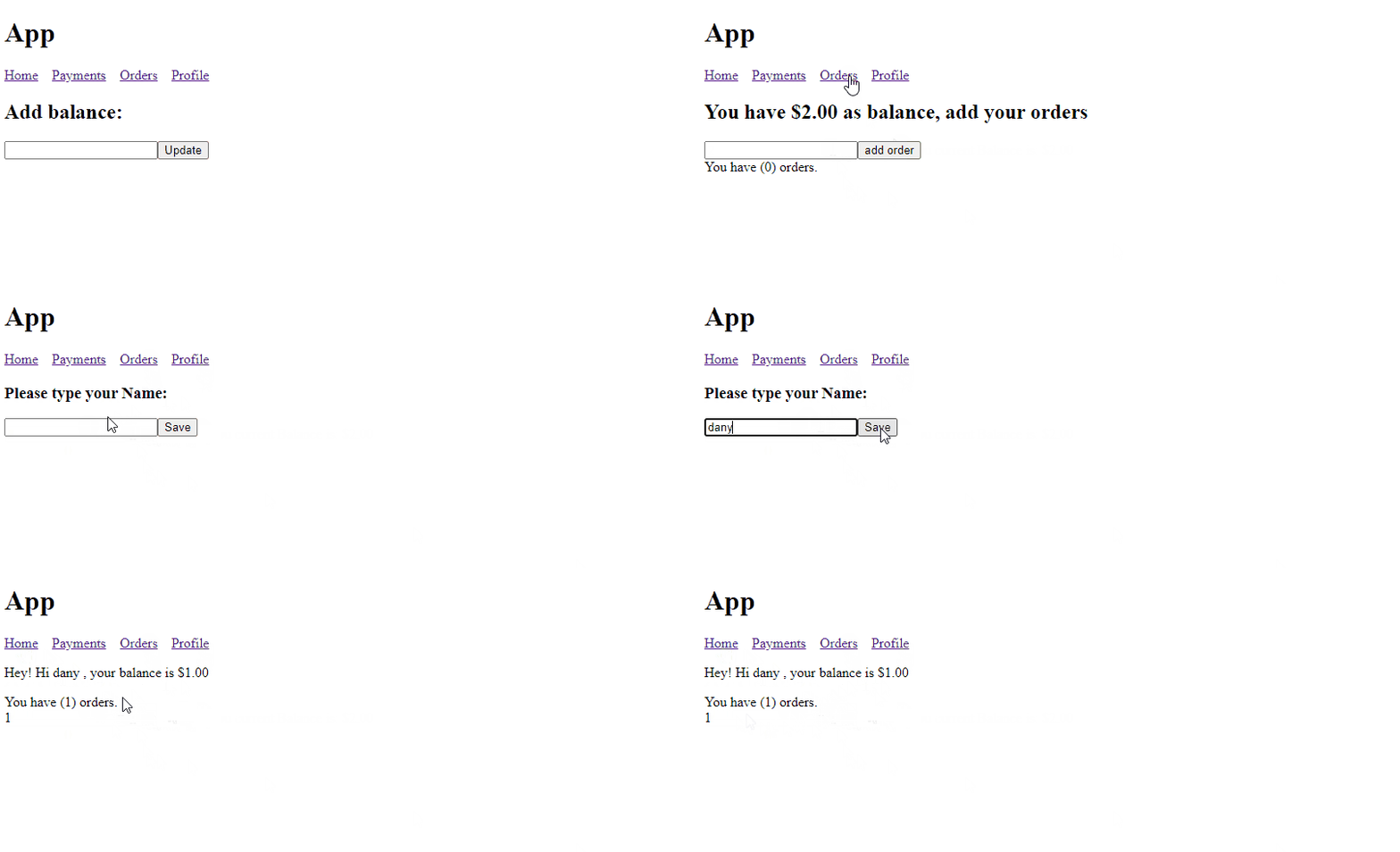
We have three injections in the `home.component.ts` to provide the component information. It works but is too much noise in the `home.component.ts`; maybe we can simplify it.
### Centralize The Behavior Subject
One solution is to create `appService`; it provide all state required by our app; instead of injecting all services into each page, we have a single entry point. Let start:
* Create a new service `AppService`
* Inject `ProfileService`, `OrdersService`, and `PaymentsService`
* Use the `combineLatest` operator to combine each service data in a single object and expose it in the property `customerInfo$`
* Add two property `orders$` and `balance$`.
* Add the method `addOrder` to update the balance and the orders.
```typescript
import {Injectable} from '@angular/core';
import {ProfileService} from "./profile.service";
import {OrdersService} from "./orders.service";
import {PaymentsService} from "./payments.service";
import {map} from 'rxjs/internal/operators/map';
import {combineLatest} from 'rxjs';
@Injectable({
providedIn: 'root'
})
export class AppService {
public customerInfo$ = combineLatest([
this.paymentService.paymentBalance$,
this.profileService.name$,
]).pipe(
map(([balance, name]) => ({balance, name}))
);
public customer$ = this.profileService.name$;
public orders$ = this.orderService.orders$;
public balance$ = this.paymentService.paymentBalance$;
constructor(
private profileService: ProfileService,
private orderService: OrdersService,
private paymentService: PaymentsService
) {
}
addOrder(order: number) {
this.orderService.addOrder(order);
this.paymentService.updateBalance(order);
}
}
```
In the `home.component.html` remove the services, and add the `appService` in the constructor, and update the reference of `customerStatus` to point to the `customerInfo$` method from `appService`.
Save, and everything continues working as expected.
```typescript
import {Component} from '@angular/core';
import {HomeService} from "./home.service";
@Component({
selector: 'app-home',
templateUrl: './home.component.html',
styleUrls: ['./home.component.css'],
})
export class HomeComponent {
customerStatus$ = this.appService.customerInfo$;
constructor(private appService: AppService) {
}
}
```
The home service has fewer dependencies, so our code looks clean. We can simplify our solution and delegate some responsibility to a specific component.
## Component Responsibility
The home page has two sections, which repeat in pages, the username with the balance and the list of orders.
Let's start with the `OrderListComponent`, using the Angular/CLI to generate a new component `ng g c /components/orderlist`:
* Inject the `AppService` in the constructor.
* Declare an `orders$` observable to read all orders in the services.
* Open the HTML Markup and subscribe to the `orders$` observable using the pipe `async` and iterate with the `ngFor`.
The final code looks like this:
```typescript
import {Component} from '@angular/core';
import {AppService} from "../../services/app.service";
@Component({
selector: 'app-order-list',
templateUrl: './order-list.component.html',
styleUrls: ['./order-list.component.css']
})
export class OrderListComponent {
orders$ = this.appService.orders$;
constructor(private appService: AppService) {
}
}
```
```html
You have ({{orders.length}}) orders.
{{order}}
```
The exact process with the customer message creates a component with `Angular/CLI`.
* Run the command `ng g c /components/customer-message`
* Inject the `AppService` in the constructor
* Declare a `customerInfo$` observable to read the `customerAndBalance$` value.
* Open the HTML Markup and subscribe to the `customerInfo$` observable using the pipe `async`.
The final code looks like this:
```typescript
import {Component} from '@angular/core';
import {AppService} from "../../services/app.service";
@Component({
selector: 'app-customer-message',
templateUrl: './customer-message.component.html',
styleUrls: ['./customer-message.component.css']
})
export class CustomerMessageComponent {
public customerInfo$ = this.appService.customerAndBalance$;
constructor(private appService: AppService) {
}
}
```
```html
Hey! {{customer.name}}, your balance is {{ customer.balance | currency }}
Please add your name and balance
```
We already inject the AppService `orderList` and `customerMessage`, which helps simplify the app and refactor other components.
## Refactor Components
We have two components to simplify the home and orders.
The Home component works like a container for the `customerMessage` and `orderList` components, so lets to clean up:
* Remove the appService injection from the constructor.
* In the template, use the customer-message and listOrder components.
The Final Code looks like this:
```typescript
import {Component} from '@angular/core';
@Component({
selector: 'app-home',
templateUrl: './home.component.html',
styleUrls: ['./home.component.css'],
})
export class HomeComponent {
}
```
```html
```
The Orders component becomes simple using the AppService and the orderlist component.
* Inject the `AppService` in the constructor
* Declare a `balance$` observable to read the balance value from AppService.
* Update the `addOrder` method to call the same from `appService`.
* Open the HTML Markup and subscribe to the `balance$` observable using the pipe `async`.
* Add the `customer` and `orderlist` component to show the user data and list of orders.
The final code looks like this:
```typescript
import {Component} from '@angular/core';
import {AppService} from "../../services/app.service";
@Component({
selector: 'app-orders',
templateUrl: './orders.component.html',
styleUrls: ['./orders.component.css'],
})
export class OrdersComponent {
balance$ = this.appService.balance$
constructor(
private appService: AppService
) {
}
addOrder(order: HTMLInputElement) {
this.appService.addOrder(order.valueAsNumber)
order.value = '';
}
}
```
```html
Insufficient Balance, please add.
```
## What I Learn
It was a tiny example; we had time to review and take time without time, market, team speed, and company pressure.
* Use Rxjs Observable, which allows us to build a reactive application fast without too much complexity.
* When each entity has its service to keep the state, if one component needs all information, it requires injecting all of them.
* To reduce the amount of injection, we combine all in "bridge" services to connect with multiple behavior subjects like `AppService`
* We must detect which components can work isolated, provide functionality without too many dependencies, and simplify our components.
* Using the pattern smart and dump components help to simplify the component's composition.
## Do I need a State Manager?
If your app is an MVP or small like this, the BehaviorSubject is ok; I want to take some time to build the same app again using some state manager like **NgRx or NGXS**.
See you soon!
_Photo by [Alexandra Smielova](https://unsplash.com/@sashasmelova?utm_source=unsplashx&utm_medium=referral) on [Unsplash](https://unsplash.com/?utm_source=unsplashx&utm_medium=referral)_